

- Simulation
- Steam Early Access
- Mods from mod.io
- 6 to 64+ players
EcoServer Hosting
Give your group a planet that stays online while the meteor counts down. You set the world size, the deadline and who gets in, add mods if you want them, and play as a group of six or a civilization of 64 and more.
- Instant setup
- DDoS protection
- 24/7 support
- Full file access
- NVMe SSD storage
- 3 day money-back
Starting at A$17.81 AUD/month
Choose your plan
Server location
Nearest to you
- Common
- Most popular
- Best value


Secure and trusted payments
Server locations around the world
Pick the location closest to your players for the lowest latency. Test your ping from this browser to each of our data centers and see the hardware behind every one.
- Locations
- 16+
- Top CPU clock
- 5.7 GHz
- Support
- 24/7

North America
Virginia
Your ping
- Processor
- AMD EPYC 4465P
- Max clock
- 5.40 GHz
- Memory
- DDR5
- Network port
- 1-10 Gbps
Your ping
Your ping test starts in a moment.
North America
South America
Europe
Asia Pacific
Everything Your Eco Server Needs
Eco server hosting has one job: keep a living planet running for weeks without a break. Fast hardware, a protected network and a team on call come with every plan.
Network
Always-on DDoS Protection
An Eco world runs toward a deadline in real days, and an outage takes hours from it that nobody gets back. We filter attack traffic out before it reaches your server, on every plan and at every hour.
Hardware
NVMe SSDs
An Eco save holds a whole planet: its forests, its herds, its buildings and its laws. NVMe drives write that save quickly, so a busy town does not stall while the world goes to disk.
Hardware
AMD Ryzen and EPYC Processors
The simulation works around the clock. Plants grow and animals roam whether or not a citizen is online. The AMD processors under your world reach clock speeds of up to 5.7 GHz.
Support
Support Around the Clock
A mod that refuses to load, or a world that will not generate? Ask our team by ticket or live chat at any hour, or follow a step-by-step guide for the common jobs.
Panel
Automatic Tasks
Schedule a restart for the quiet hours, when few citizens are online. Set it once and the panel keeps doing it.
Panel
Bring In Your Co-Admins
Hand the friends who help run the world access to the control panel, so one of them can restart the server or change a setting while you are away. Each person gets only the permissions you give them.
Network
Automatic Failover
When a machine fails, we restart your server on a healthy one automatically. The meteor's clock counts real time, so your citizens get back to work without waiting on a ticket.
Network
Low Latency Routes
Felling a tree, laying a road and trading at a store all feel better on a low ping. We control the routes your citizens' traffic takes and tune them for performance, so choose the location nearest your group.
Dedicated servers
Why rent an Eco dedicated server?
An Eco world keeps living after you log off. Crops ripen, animals breed and the meteor's clock counts real days, so the planet needs a machine that stays on. An Eco dedicated server is that machine, and every setting on it is yours.
A planet that stays awake
By default the meteor lands 30 real days after the world first starts. A hosted server runs through every one of them, so citizens in any time zone can log in, do their part and leave.
Your world size
Pick the map before the world is generated. Strange Loop Games recommends 100 by 100 for a small server and supports worlds up to 160 by 160 for the largest communities.
Your settings
Move the meteor's deadline or switch the meteor off. Choose a collaboration preset to set how fast citizens gain skill points, list the server publicly or lock it with a password, and name your own admins.
The game
Eco multiplayer: one planet, one meteor, many citizens
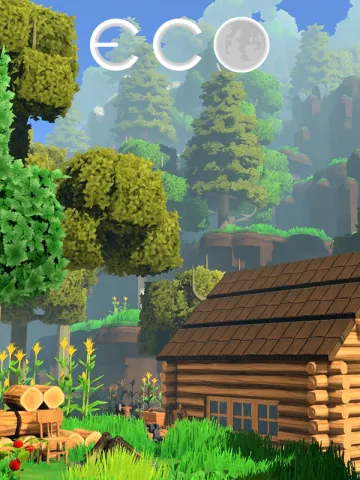
Eco is a simulation game from Strange Loop Games, in Early Access on Steam. Your group starts at the dawn of civilization on a planet full of plants and animals, with a meteor on the way. Stopping it takes industry, and careless industry can wreck the planet first.
How to set up an Eco server
- Pick the plan that fits your group.
- Choose the data center closest to your citizens.
- Check out, and we build the server for you.
- In the control panel, set the server's name and choose the world size before the first start. A different size later means a new world.
- Add your player ID as an admin and start the server. The first start takes a while, because the server generates the planet.
How to connect to your Eco server
- Start Eco and open the server browser.
- Search for your server's name. It shows there once
Public Serveris switched on. - For a private server, connect with its address and game port, for example
203.0.113.10:3000. - Enter the password if the server has one.
Use the game port to join. The second port belongs to the server's web interface.
How to add admins and a whitelist
Eco keeps its admins, its whitelist and its blacklist in Users.eco, in the server's Configs folder. Each list takes player IDs. A name on its own does nothing.
- Ask the player to type
/whoisin chat to see their ID. A Strange Loop Games account has an SLG ID, and a Steam-only player uses a SteamID64. - Stop your Eco server and add the ID to the list you want.
- Start it again.
A whitelist works only on a server that has a password. Whitelisted players skip the password.
How to add mods to an Eco server
- Download the mod. mod.io is the official home for Eco mods.
- Stop your server before you touch its files.
- Upload the mod's files to the server's
Modsfolder, following the author's instructions. - Start the server again.
Your players install nothing. The game downloads what it needs from the server when they join.
A shared ecosystem
Every tree felled and every animal hunted comes out of one simulation. Take too much and a species dies out for good. Pollute the land and crops fail.
An economy your players run
Citizens take up different trades and deal with each other through stores, contracts and currencies they create themselves.
Laws the game enforces
Citizens propose laws and vote on them, and a law that passes becomes a hard limit in the world. Homesteads grow into towns, towns join into countries, and countries can form a federation.
What our customers say
We’re rated excellent or 4.3/5.0 based on over 435+ reviews at
- June 14th
Great host! “ I've been with this host for a little over 7 months now. Support is given almost instantly. Max I ever waited was 30(ish) minutes. ”
- Daniel Ramirez
- May 20th
Excellent and easy to use host “ Excellent service, really quick and easy to set up with lots of options and systems that really take the hassle out of hosting a server. ”
- Reece Cooper
- May 5th
I LOVE using RAMShard! “ I very much LOVE using RAMShard. It's efficient, easy to use, and the staff is extremely helpful! ”
- Cole Spencer
Looking for more customer reviews?
Read More »FAQ
Have your own question? Ask us.
That depends on the plan. Homestead suits up to 6 players, Town up to 24, and Federation 64 and more. Federation has the most memory, which also helps a large world or a long list of mods. Move to a bigger plan whenever the group grows, and the world comes with you.
Each plan's monthly price is on its card at the top of this page. Each price covers the server, DDoS protection and support, and there is no setup fee. Quarterly and annual billing bring the monthly price down.
Yes. The server's meteor settings hold `Meteor Impact Days`, the number of real days between the world's first start and the impact, which is 30 by default. Set `Create Meteor` to false and the world has no meteor. Decide before you generate the world: Strange Loop Games warns against switching the meteor on in a world that is already running.
Edit the dimensions in `WorldGenerator.eco`. Both numbers must match and divide by 4. Strange Loop Games recommends 100 by 100 for a small server and 140 by 140 for a medium or large one, and supports up to 160 by 160. A new size applies only to a newly generated world, so settle it before your citizens start building.
Yes. You have full access to the server's files, so you can upload mods to its `Mods` folder and restart. mod.io is the official place to find them. Community authors make the mods, so check that each one supports your server's version of Eco. Your players install nothing: the game fetches what it needs from the server when they join.
Set a password in the server's network settings and switch `Public Server` off to keep it out of the server browser. Add a whitelist if you want regulars to skip the password, and a blacklist for anyone you want kept out.
Yes. An Eco world lives in the server's `Storage` folder, in the files `Game.db` and `Game.eco`. Stop your new server, replace its copies with the ones from the server the world ran on, and start it again. Bring across any mods the world used as well.
Eco is a PC game. Strange Loop Games sells it on Steam and through its own site, and we know of no console version, so there is no console crossplay to set up. Every player needs the PC game to join your server.
You can. Strange Loop Games gives the server software to everyone who owns the game. Your PC then has to stay on day and night, because the world and the meteor's clock stop for nobody, and you forward the game and web ports on your router yourself. A rented server runs in a data center around the clock, and you manage it from a control panel in your browser.
Yes. Our support team answers by ticket and live chat at any hour, and the knowledge base walks through the common jobs one step at a time.
Every order has a 3 day money back guarantee. Contact us within 3 days of payment and we refund you in full.
Visa, Mastercard, American Express, PayPal, Apple Pay, Google Pay and Link.
Need a different game?
Choose from our list of games below.



