
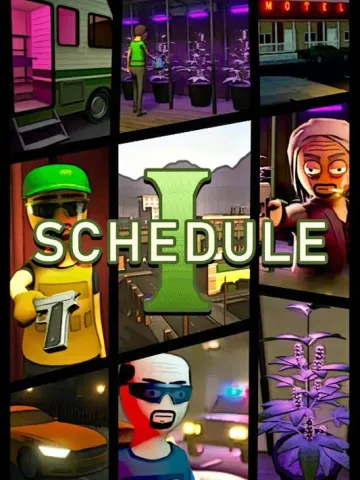

- Simulation
- Early Access
- Up to 16 players
- MelonLoader mods
Schedule 1Server Hosting
Keep Hyland Point open after the host logs off. A RAMShard Schedule 1 server runs your crew's operation around the clock for 4, 8 or 16 players on Steam, so whoever has a free hour can log in and get to work.
- Instant setup
- DDoS protection
- 24/7 support
- Full file access
- NVMe SSD storage
- 3 day money-back
Starting at €10.48 EUR/month

Choose your plan
Server location
Nearest to you
- Common
- Most popular
- Best value


Secure and trusted payments
Server locations around the world
Pick the location closest to your players for the lowest latency. Test your ping from this browser to each of our data centers and see the hardware behind every one.
- Locations
- 16+
- Top CPU clock
- 5.7 GHz
- Support
- 24/7

North America
Virginia
Your ping
- Processor
- AMD EPYC 4465P
- Max clock
- 5.40 GHz
- Memory
- DDR5
- Network port
- 1-10 Gbps
Your ping
Your ping test starts in a moment.
North America
South America
Europe
Asia Pacific
Everything Your Schedule 1 Server Needs
Schedule 1 server hosting for a crew that plays at different hours: quick hardware, a protected network and a support team that stays on shift. Every plan includes all of it.
Network
Always-on DDoS Protection
Your operation in Hyland Point has enough rivals already. We filter attack traffic before it reaches your server, on every plan and at every hour.
Hardware
NVMe SSDs
A Schedule 1 save holds every property, every shelf of stock and every employee you have hired. NVMe drives write it quickly, and you choose how often the server saves.
Hardware
AMD Ryzen and EPYC Processors
Customers, dealers, employees and police all move through Hyland Point at once, and the server simulates every one of them on AMD processors that reach clock speeds of up to 5.7 GHz.
Support
Support Around the Clock
A client mod that will not connect, or a save that did not load? Ask our team by ticket or live chat at any hour. Our guides walk through the common jobs one step at a time.
Panel
Automatic Tasks
Put a restart on a timer, for example early each morning before the crew logs in. You set the task once and the panel repeats it.
Panel
Bring In Your Crew
Share the control panel with your partners so one of them can restart the server or change a setting while you are away. You decide what each person can do.
Network
Automatic Failover
When a machine fails, we start your server again on a healthy one without waiting for a ticket. Your crew logs back in and carries on with the operation.
Network
Low Latency Routes
Skating to a deal, driving a delivery and outrunning a patrol all feel better at low ping. We control and tune the routes your players' traffic takes, so choose the location nearest your crew.
Why rent a server
What a Schedule 1 dedicated server changes
In Schedule 1's built-in co-op, one player hosts, and Hyland Point closes when that player quits. A Schedule 1 dedicated server keeps the town running in a data center. The operation then belongs to the whole crew, and any of you can log in at any hour.
Open all hours
The server keeps simulating the town with nobody connected, unless you tell it to pause when empty. You choose whether the clock runs while the crew sleeps.
Room for a bigger crew
Plans hold 4, 8 or 16 players at once. Split the work: some of you produce, some run deliveries on foot, skateboard or by car, and someone manages the properties and employees.
Your town, your settings
Set a password, allow or block sleeping to skip the night, change how fast a day passes and decide whether a new save starts with the intro.
Mods and setup
How a modded Schedule 1 server works
Schedule 1, written Schedule I on Steam, is TVGS's co-op crime sim in Early Access. You arrive in Hyland Point with nothing and build a production and distribution business. Dedicated servers for it run on S1DedicatedServers, a community mod that TVGS neither makes nor endorses, so every player does a short setup once.
How to set up a Schedule 1 server
- Choose a plan by the number of players in your crew.
- Pick the location closest to where most of you live.
- Pay, and we build the server straight away.
- In the control panel, give the server a name and a description, and set a password if you want it private.
- Start the server and send your crew its IP address and port.
How to join your Schedule 1 server
- Run the MelonLoader installer, select Schedule I and click Install.
- Download the client files that match your server, IL2CPP or Mono, from the S1DedicatedServers releases page. Merge their
Modsfolder into your game folder. - Launch the game and click Servers in the main menu.
- Click Add Server, enter a name, the IP address and the port, then click Save Server.
- Select the server and click Join. Enter the password if it has one.
For a Mono server, first switch the game to the alternate branch in Steam: open Properties, then Game Versions & Betas.
How to move an existing save to your server
The mod's authors recommend a fresh server save. To bring a world across anyway:
- Start the server once so it creates its own save, then stop it.
- Back up the server's save and your own. Your saves sit under
AppData\LocalLow\TVGS\Schedule I\Saves. - Copy the world and progression files from your save into the server's
UserData/DedicatedServerSavefolder. Leave the server's ownPlayers/Player_0folder untouched. - Start the server and check that the world loads before you invite anyone.
How to add admins to your server
Staff roles live in UserData/permissions.toml. The mod has five built-in groups: default, support, moderator, administrator and operator. Each group allows a different set of commands.
- Open
permissions.tomland add the player to a group. - Run
reloadpermissionsin the server console.
Staff open the in-game console with the backquote key and use commands such as kick, ban and save.
One-time client setup
Each player installs MelonLoader and the mod's client files. A Servers button then appears in the main menu, and single-player and normal co-op keep working as before.
IL2CPP or Mono
An IL2CPP server matches the standard Steam version of the game. A Mono server matches the game's alternate branch and suits heavier modding. Everyone plays on the same version as the server.
More mods on top
MelonLoader loads other mods as well. You add them to the server's Mods folder with full access to its files, and a policy file sets which client mods players may bring.
What our customers say
We’re rated excellent or 4.3/5.0 based on over 435+ reviews at
- June 14th
Great host! “ I've been with this host for a little over 7 months now. Support is given almost instantly. Max I ever waited was 30(ish) minutes. ”
- Daniel Ramirez
- May 20th
Excellent and easy to use host “ Excellent service, really quick and easy to set up with lots of options and systems that really take the hassle out of hosting a server. ”
- Reece Cooper
- May 5th
I LOVE using RAMShard! “ I very much LOVE using RAMShard. It's efficient, easy to use, and the staff is extremely helpful! ”
- Cole Spencer
Looking for more customer reviews?
Read More »FAQ
Have your own question? Ask us.
Up to 16 on our largest plan. Motel holds 4 players, Bungalow holds 8 and Warehouse holds 16. Warehouse also has the most memory, which gives a large operation with many properties and employees more room. You can move to a bigger plan later and keep your save.
No. The game's own multiplayer is co-op hosted by one of the players. Our servers run S1DedicatedServers, a community mod that is not affiliated with or endorsed by TVGS. It runs the game as a headless server that stays online without a host.
Yes. Each player needs MelonLoader and the client files of the S1DedicatedServers mod. They install both once. Single-player and normal co-op still work with the client files installed.
Schedule 1 is sold on Steam for Windows and has no console version, so there is no other platform to play across. Everyone on your server joins from the Steam version of the game.
Yes. Schedule 1 mods load through MelonLoader, which your server already runs. Upload a mod to the server's Mods folder with full file access and restart. For a long mod list, pick the Mono version of the server, which suits heavier modding.
Yes, with care. Let the server create its own save first, then copy your world and progression files into it and leave the server's own player folder in place. The steps are in the panel above. Back up both saves before you start.
Yes. Set a server password and share it with your crew alone. The game asks each player for it when they click Join. Leave the password empty and anyone with the address can join.
The server and every player must run the same build of the game, and the mod's files have to match that build. After a game patch, the mod may need a new release of its own before servers work again. Once the server is updated, each player updates the client files too.
You can. With the S1DedicatedServers mod you copy your game folder, add the server files and open the server to your friends yourself. The server then shares your PC's memory and processor with anything else you run, and it goes offline when the PC does. A rented server sits in a data center and stays up all day and night.
Yes. You can reach our support team by ticket or live chat at any hour of the day, and they will help you get your crew connected.
Yes. Every plan comes with a 3 day money back guarantee. Ask us within 3 days of paying and we refund you in full.
Visa, Mastercard, American Express, PayPal, Apple Pay, Google Pay and Link.
Need a different game?
Choose from our list of games below.



