

- Survival
- Early access
- 1 to 8 players
- Co-op town building
RomesteadServer Hosting
The empire is in ruins and your party is the one putting it back together. Keep a single shared world online around the clock for up to eight players, so the town grows whenever any of you has an hour to play.
- Instant setup
- DDoS protection
- 24/7 support
- Full file access
- NVMe SSD storage
- 3 day money-back
Starting at $9.99 USD/month
Choose your plan
Server location
Nearest to you
- Common
- Legendary
Secure and trusted payments
Server locations around the world
Pick the location closest to your players for the lowest latency. Test your ping from this browser to each of our data centers and see the hardware behind every one.
- Locations
- 16+
- Top CPU clock
- 5.7 GHz
- Support
- 24/7

North America
Virginia
Your ping
- Processor
- AMD EPYC 4465P
- Max clock
- 5.40 GHz
- Memory
- DDR5
- Network port
- 1-10 Gbps
Your ping
Your ping test starts in a moment.
North America
South America
Europe
Asia Pacific
Everything Your Romestead Server Needs
Romestead server hosting for a town that keeps standing after you log off: fast hardware, a protected network and a support team awake at any hour. Both plans include all of it.
Network
Always-on DDoS Protection
A town that took your party weeks to raise should stay reachable. We filter attack traffic before it reaches your server, on both plans, at every hour of the day.
Hardware
NVMe SSDs
Your Romestead world holds every wall, cart, crop row and citizen your party has placed. NVMe drives write that world to disk quickly, and they load it quickly when the server starts.
Hardware
AMD Ryzen and EPYC Processors
A Romestead server has plenty to keep track of: the walking dead, your citizens, and every log and boulder lying in the world. The AMD processors behind it reach clock speeds of up to 5.7 GHz.
Support
Support Around the Clock
Is a save refusing to load, or a friend unable to connect? Write to us by ticket or live chat at any hour. Our guides walk through the common jobs one step at a time.
Panel
Automatic Tasks
Schedule a restart on an interval, for example early each morning before anyone logs in. Set the task once and the panel repeats it for you.
Panel
Bring In Your Co-Builders
Give the friends you build with access to the control panel, so one of them can restart the server or change a setting while you are away. You decide what each person may do.
Network
Automatic Failover
When a machine fails, your server starts again on a healthy one by itself. The town comes back online without a ticket, and your party carries on building.
Network
Low Latency Routes
Fighting off the walking dead after dark is easier on a low ping. We control the routes your party's traffic takes and tune them for performance, so pick the location nearest your group.
Dedicated servers
What a Romestead dedicated server changes for your party
Romestead lets one player host a world for friends from their own PC, and that world goes offline when the host does. A Romestead dedicated server runs the world in a data center, so the town is open to the whole party at any hour.
The gates stay open
Anyone can log in to haul stone, tend the fields or check on the citizens while the rest of the party is at work or asleep. The storehouses are as full as the last player left them.
Room for all eight
Romestead supports one to eight players, and it scales its difficulty to the number of players in the world. Town holds the full eight. Camp suits a party of five.
Carry on from your own save
Started alone, or on a friend's PC? Upload that world to the server and name it in the settings. Everything saved in it comes along.
About the game
Romestead: co-op survival where your party raises a town from ruins
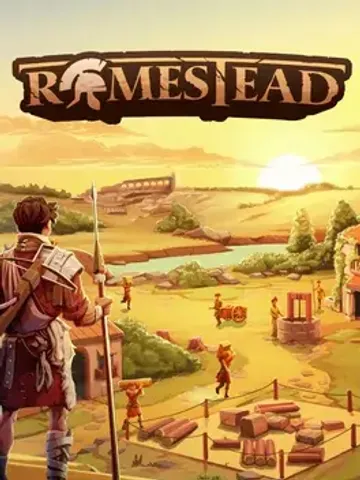
Romestead is a top-down survival and town-building game from Beartwigs, in early access on Steam. The dead walk at night and the gods have gone quiet. Your party builds its way from a first camp to a working town, and a private server gives you one world to do it in.
How to set up a Romestead server
- Pick Camp for a party of up to five, or Town for the full eight.
- Choose the server location nearest your party.
- Check out, and we create the server for you.
- In the control panel, give the server a password.
- Start the server, then send its address, port and password to your friends.
How to join your Romestead server
- Copy your server's address and port from the control panel.
- Open Romestead and create your character.
- Choose Advanced/LAN.
- Enter the address and the port, then press Connect.
- Type the server's password if it has one.
The server has to be running before anyone can connect.
How to upload a world you already started
- On your PC, open
%APPDATA%\Romestead\EA\profiles\1\saved_worldsand make a copy of your world's save. - Stop the server.
- Upload the save to the server's
saved_worldsfolder. - In the server's settings, set the auto start world name (
AutoStartWorldNameinconfig.json) to the name of the save you uploaded. - Start the server. It loads that world for everyone who joins.
How to make your Romestead server private
- Stop the server.
- Open the server's settings and type a password in the password field (
Passwordinconfig.json). - Save, then start the server.
- Send the password to your party along with the address and port.
A server with an empty password lets in anyone who has its address.
Haul it, cart it, throw it
Logs, ores and rocks are physical objects. Carry them one at a time, link carts into a train, or throw a boulder at whatever is chasing you. More hands move more stone.
Citizens with trades
Recruit survivors as artisans and keep them happy. Towns become hubs for crafting, farming and automated production, with trade routes running between biomes.
Gods to win back
Offerings and sacrifices win back the gods' favour, which unlocks technologies, buffs and upgrades. Early access has three biomes, and Beartwigs plans more.
What our customers say
We’re rated excellent or 4.3/5.0 based on over 435+ reviews at
- June 14th
Great host! “ I've been with this host for a little over 7 months now. Support is given almost instantly. Max I ever waited was 30(ish) minutes. ”
- Daniel Ramirez
- May 20th
Excellent and easy to use host “ Excellent service, really quick and easy to set up with lots of options and systems that really take the hassle out of hosting a server. ”
- Reece Cooper
- May 5th
I LOVE using RAMShard! “ I very much LOVE using RAMShard. It's efficient, easy to use, and the staff is extremely helpful! ”
- Cole Spencer
Looking for more customer reviews?
Read More »FAQ
Have your own question? Ask us.
Eight. Romestead supports one to eight players in co-op, and a dedicated server holds the same eight. Camp fits a party of up to five, and Town fits the full eight.
Beartwigs sells Romestead on Steam for Windows PC and lists no console version. Every player joins your server from the Steam version, so there is no second platform to cross over with.
Yes. The game scales its difficulty to the number of players in the world. A full party of eight faces a tougher night than two friends do, and the scaling follows whoever is online.
Yes. Beartwigs expects early access to last one to two years and plans to add biomes, progression tiers and points of interest along the way. The early access version has three biomes and co-op for up to eight players.
You can. Romestead lets you host your own server or connect peer to peer. A world on your PC is online only while that PC is on, you open the server's port (UDP 8050 by default) on your router, and you update the server yourself after each patch. A server you rent from us sits in a data center, stays up all day and night, and has a control panel you open in a browser.
Create your character, choose Advanced/LAN, enter your server's address and port, and press Connect. If the server has a password, the game asks for it. Friends reach a dedicated server by its address, so send them the address and the port.
Yes. Copy the save from the saved_worlds folder on your PC, upload it to the same folder on the server, and set the server's auto start world name to that save's name. Restart the server and your party carries on in the world you already built.
Both plans show their monthly price at the top of this page. That price includes the server, DDoS protection and support, and there is no setup fee. Choose quarterly or annual billing and the monthly figure drops.
Go by the size of your party. Camp suits up to five players. Town holds all eight and has twice the memory. You can move from Camp to Town later and keep your world.
Yes. Our support team answers by ticket and live chat at any hour, and the knowledge base explains the common jobs one step at a time.
A 3 day money back guarantee covers you. Contact us within 3 days of your payment and we refund it in full.
Visa, Mastercard, American Express, PayPal, Apple Pay, Google Pay and Link.
Need a different game?
Choose from our list of games below.



