
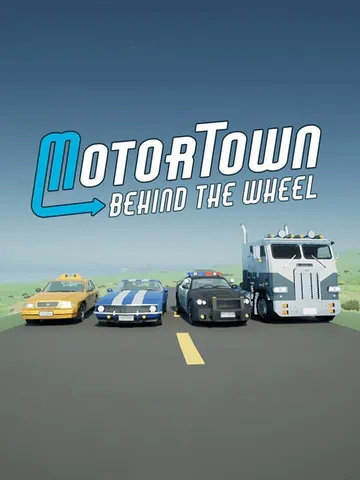

- Open-world driving
- Early Access
- PC on Steam
- 4 to 48 players
Motor Town: Behind The WheelServer Hosting
Give your crew a Motor Town that stays open after you park up for the night. Friends on Steam join whenever they like to haul cargo, drive bus routes and race, on a server sized for 4, 16 or 48 players.
- Instant setup
- DDoS protection
- 24/7 support
- Full file access
- NVMe SSD storage
- 3 day money-back
Starting at R$116,31 BRL/month

Choose your plan
Server location
Nearest to you
- Common


- Most popular

- Best value

Secure and trusted payments
Server locations around the world
Pick the location closest to your players for the lowest latency. Test your ping from this browser to each of our data centers and see the hardware behind every one.
- Locations
- 16+
- Top CPU clock
- 5.7 GHz
- Support
- 24/7

North America
Virginia
Your ping
- Processor
- AMD EPYC 4465P
- Max clock
- 5.40 GHz
- Memory
- DDR5
- Network port
- 1-10 Gbps
Your ping
Your ping test starts in a moment.
North America
South America
Europe
Asia Pacific
Everything Your Motor Town Server Needs
Motor Town: Behind The Wheel server hosting for crews that drive at all hours: fast hardware, a protected network and a support team on call. Every plan includes all of it.
Network
Always-on DDoS Protection
A public Motor Town server with a busy company roster is worth protecting. We filter attack traffic before it reaches your server, on every plan and at every hour.
Hardware
NVMe SSDs
A Motor Town world has a lot to remember: each driver's vehicles and money, cargo on the road and every company's routes. NVMe drives write those saves fast, so the road stays smooth while the server saves.
Hardware
AMD Ryzen and EPYC Processors
A full lobby of trucks, buses and traffic gives a processor plenty to do. Our AMD processors reach clock speeds of up to 5.7 GHz.
Support
Support Around the Clock
Server missing from the list, or a setting that will not stick? Our team answers by ticket and live chat at any hour, and our guides walk you through the common jobs.
Panel
Automatic Tasks
Schedule restarts on an interval, such as one early each morning while the roads are empty. Set a task once and the panel repeats it for you.
Panel
Share the Keys With Your Crew
Give a co-owner or a driver you rely on access to the control panel, so someone can restart the server or change a setting while you are off the road. You decide what each person can do.
Network
Automatic Failover
When a machine fails, we restart your server on a healthy one without waiting for you to ask. Your drivers get back on the road, and nobody has to open a ticket.
Network
Low Latency Routes
Steering, braking and close racing all feel better on a low ping. We control the routes your players' traffic takes and tune them for speed. Choose the location nearest your drivers.
Dedicated servers
Why rent a Motor Town: Behind The Wheel dedicated server?
Motor Town rewards the long haul: cargo runs, bus routes and a company that grows over weeks. A Motor Town: Behind The Wheel dedicated server keeps that world online in a data center around the clock, so the town is open whenever one of your drivers wants a shift.
Open all hours
Friends in different time zones clock in when it suits them. They find the same world they left, and nobody has to wait for one person to come online first.
Room for the whole crew
Choose a plan for 4, 16 or 48 players. A small server suits friends running deliveries together. A large one has room for a public community with rival companies.
Your town, your rules
Name the server, write the message players see when they connect and set limits such as vehicles per player. Keep it private for friends or open it to every driver.
The game
An open-world driving life, shared on your Motor Town server
Motor Town: Behind The Wheel is an open-world driving game from P3 Games, in Early Access on Steam. You earn a living behind the wheel across a 24 by 16 km map with a day and night cycle, alone or with other players.
How to set up a Motor Town server
- Choose a plan by the number of drivers you expect online together.
- Pick the server location closest to them.
- Pay, and we build the server for you.
- In the control panel, give the server a name your friends will recognise.
- Start the server.
How to join your Motor Town server
- Open Motor Town: Behind The Wheel from Steam.
- Open the game's multiplayer server list.
- Look for your server by its name.
- Select the server and connect.
A distinctive server name is quicker to find than a common one.
How to make your Motor Town server private
Motor Town keeps its server settings in a file named DedicatedServerConfig.json.
- Stop the server.
- Open
DedicatedServerConfig.jsonand set a password. - Start the server.
- Send the password to the drivers you want on your roads.
How to add admins to your Motor Town server
Motor Town identifies an admin by SteamID64, the 17 digit number of a Steam account.
- Stop the server.
- Open
DedicatedServerConfig.json. - Add each admin's SteamID64 to the admin list, with a comma between entries.
- Save the file and start the server.
Work that pays
Pick up hitchhikers, drive a taxi or a bus, or haul cargo by pickup, truck and semi-trailer. Special vehicle jobs include police, tow truck and ambulance work.
Companies and routes
Create a company, draw up your own bus and truck routes, and hire AI drivers or other players to run them. On a shared server, your friends can be the staff.
Racing, your way
Race other drivers, chase a time attack record or thread an autocross course. Drive with a keyboard, a mouse, a gamepad or a steering wheel.
What our customers say
We’re rated excellent or 4.3/5.0 based on over 435+ reviews at
- June 14th
Great host! “ I've been with this host for a little over 7 months now. Support is given almost instantly. Max I ever waited was 30(ish) minutes. ”
- Daniel Ramirez
- May 20th
Excellent and easy to use host “ Excellent service, really quick and easy to set up with lots of options and systems that really take the hassle out of hosting a server. ”
- Reece Cooper
- May 5th
I LOVE using RAMShard! “ I very much LOVE using RAMShard. It's efficient, easy to use, and the staff is extremely helpful! ”
- Cole Spencer
Looking for more customer reviews?
Read More »FAQ
Have your own question? Ask us.
Your plan sets the number. Taxi has 4 player slots, Bus has 16 and Semi has 48. Semi is also the plan you can customize when you order. You can move to a bigger plan later and keep your world.
Each plan's monthly price is on its card at the top of this page. That price includes the server, DDoS protection and support, and there is no setup fee. Quarterly and annual billing bring the monthly cost down.
Motor Town is sold for Windows PC on Steam, and that is its only version. Every player joins your server from Steam, so there is no console crossplay to set up.
Open the multiplayer server list in the game, look for your server by its name, select it and connect. Give the server a distinctive name first and your friends will find it in seconds.
Yes. Set a password in the server's settings and share it with the people you want on your roads. Leave it empty and any driver who finds the server in the list can join.
Motor Town's server settings include a switch that allows or blocks modded vehicles, and the choice is yours. You also have full access to your server's files.
You can. A dedicated server tool for the game is available through Steam. Your PC then has to stay switched on for the town to be open, and you handle the router, the config file and every update yourself. A rented server sits in a data center all day and night, and you run it from a control panel in your browser.
Yes. P3 Games sells it on Steam as an Early Access game and is still adding to it. The store page lists more than 50 cars, trucks and trailers, with further special vehicle jobs planned.
Count the drivers who will be online at the same moment. Taxi fits a carful of four, Bus fits a group of 16, and Semi fits a public server of up to 48. If you are unsure, start smaller and move up when the roads get busy.
Yes. Our support team answers tickets and live chat at any hour of the day, and the knowledge base has guides for the usual first steps.
A 3 day money back guarantee covers you. Contact us within 3 days of your payment and we refund it in full.
Visa, Mastercard, American Express, PayPal, Apple Pay, Google Pay and Link.
Need a different game?
Choose from our list of games below.



