
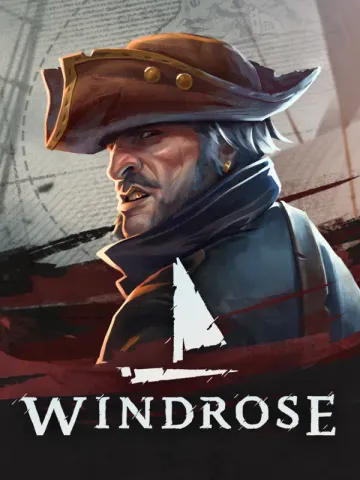

- Open world
- Early Access
- Co-op PvE
- Up to 8 players
WindroseServer Hosting
Keep your crew's corner of the Age of Piracy afloat day and night. A RAMShard Windrose server runs your islands, your base and your ships for up to eight players, so anyone with the invite code can set sail whenever they have an hour.
- Instant setup
- DDoS protection
- 24/7 support
- Full file access
- NVMe SSD storage
- 3 day money-back
Starting at R$98,86 BRL/month
Choose your plan
Server location
Nearest to you
- Common


- Most popular
- Best value

Secure and trusted payments
Server locations around the world
Pick the location closest to your players for the lowest latency. Test your ping from this browser to each of our data centers and see the hardware behind every one.
- Locations
- 16+
- Top CPU clock
- 5.7 GHz
- Support
- 24/7

North America
Virginia
Your ping
- Processor
- AMD EPYC 4465P
- Max clock
- 5.40 GHz
- Memory
- DDR5
- Network port
- 1-10 Gbps
Your ping
Your ping test starts in a moment.
North America
South America
Europe
Asia Pacific
Everything Your Windrose Server Needs
Windrose server hosting for long voyages: quick processors, a guarded network and people to call when something breaks. Every plan includes the lot.
Network
Always-on DDoS Protection
A crew that has sailed together for weeks should not lose an evening to an attack. We filter hostile traffic before it reaches your server, on every plan, at all hours.
Hardware
NVMe SSDs
Windrose writes your world to disk as the crew builds, loots and sails. NVMe drives keep those writes quick, so the server keeps pace while half the crew works the base and the other half fights at sea.
Hardware
AMD Ryzen and EPYC Processors
Cannon fire, a boarding party and a busy base can all reach the server in the same minute. Our AMD processors run at clock speeds of up to 5.7 GHz.
Support
Support Around the Clock
An invite code that finds nothing, or a world that will not load? Our team answers by ticket and live chat at any hour, and the knowledge base walks you through the routine jobs.
Panel
Automatic Tasks
Set a restart for the hours when your crew is ashore and asleep, and repeat it on an interval. You create the task once and the panel runs it from then on.
Panel
Share the Helm
Give trusted crewmates access to the control panel so one of them can restart the server or change a setting while you are away. You decide what each person can do.
Network
Automatic Failover
If a machine fails, your server starts again on a healthy one without a ticket from you. The voyage carries on from there.
Network
Low Latency Routes
Parries and dodges come down to timing. We control the routes your players' traffic takes and tune them for performance, so pick the location nearest your crew for the lowest ping.
Dedicated servers
Why give your crew a Windrose dedicated server?
Host a Windrose world from your own game and it closes when you quit, and your PC has to run the game and the world together. A Windrose dedicated server moves that world to a data center, where it stays open for the crew at any hour.
The world waits for nobody
One crewmate can cut timber and stock the base while the rest are at work. The islands, the storage and the ships stay as the last player left them.
Room for eight
A Windrose world holds up to eight players. Friends join with an invite code from the game's Connect to Server screen, and a password keeps strangers out.
Bring your current world
Already hours into a solo or co-op save? Copy its world folder to the server, point the server at it, and the crew carries on from the same shore.
About the game
Sail the Age of Piracy on a private Windrose server
Windrose is an open-world PvE adventure from Kraken Express, set in the Golden Age of Piracy and in Early Access on PC. Your crew explores islands, builds a base and fights at sea. A private server gives all of you one shared world for it, open whenever someone wants to play.
Setting up a Windrose server
- Pick the plan that fits your crew: three, six or eight players.
- Choose the data center closest to where your crew lives.
- Check out, and we build the server for you.
- Stop the server and open
ServerDescription.json. SetServerName,InviteCodeandMaxPlayerCount. - For a private server, set
Passwordand changeIsPasswordProtectedtotrue. - Start the server and send the invite code to your crew.
An invite code needs at least six characters and may use letters and digits only.
Joining with an invite code
- Open Windrose and select Play.
- Select Connect to Server.
- Paste the server's invite code. Capital and small letters count as different characters.
- Enter the password if the server has one.
If the code finds nothing, check that every player has picked the same connection region in the game.
Moving an existing world to your server
- Close the game and stop the server.
- On your PC, open
%LOCALAPPDATA%\R5\Saved\SaveProfilesand your profile folder inside it. - Find the world's folder under
Worlds. The folder's name is the world's ID, so leave it unchanged. - Back up the server's saves, then upload the whole folder to the server's
Worldsfolder for the same game version. - Set
WorldIslandIdinServerDescription.jsonto the folder's name. - Start the server.
A server that starts a fresh world has not found that ID. Check the value and start it again.
Changing the world's difficulty
Each Windrose world uses a preset: Easy, Medium or Hard. A Custom world sets its own values for enemy health and damage, ship health and damage, and how hard boarding is. You can also choose whether the crew shares quests.
- Stop the server.
- Open the world's
WorldDescription.json. - Change
WorldPresetType, or edit the values underWorldSettingsfor a Custom world. - Start the server and check the setting in the game.
Land and sea in one world
Sail between procedurally generated islands, trade cannon fire with enemy ships or board them, then drop anchor and clear dungeons on foot.
A base that works for you
Build anything from a first shelter to a fort, and recruit NPC workers to speed up harvesting and production.
Still growing
Kraken Express plans more biomes, enemies and ships before the full release. After each update, keep your server on the same version as your crew's game.
What our customers say
We’re rated excellent or 4.3/5.0 based on over 435+ reviews at
- June 14th
Great host! “ I've been with this host for a little over 7 months now. Support is given almost instantly. Max I ever waited was 30(ish) minutes. ”
- Daniel Ramirez
- May 20th
Excellent and easy to use host “ Excellent service, really quick and easy to set up with lots of options and systems that really take the hassle out of hosting a server. ”
- Reece Cooper
- May 5th
I LOVE using RAMShard! “ I very much LOVE using RAMShard. It's efficient, easy to use, and the staff is extremely helpful! ”
- Cole Spencer
Looking for more customer reviews?
Read More »FAQ
Have your own question? Ask us.
Eight. Windrose supports up to eight players in one world, and our plans are sized for crews of three, six and eight. Kraken Express recommends groups of up to four for the best experience, and says boss fights are not balanced for bigger crews.
With an invite code. In the game, select Play, then Connect to Server, and paste the code. The code is case sensitive, and every player needs the same connection region selected.
You can. Kraken Express publishes a free Windrose Dedicated Server tool on Steam for Windows. The world is online only while that PC is on, the server needs memory on top of what the game uses, and updating it after each patch is your job. A rented server lives in a data center, stays up when your PC is off, and you manage it from your browser.
Yes. Stop the server, upload your world's folder to the server's `Worlds` folder with the file manager or FTP, and set `WorldIslandId` in `ServerDescription.json` to the folder's name. Back up both copies first. If you use FTP and a save arrives damaged, Kraken Express suggests trying a different FTP program.
Yes. Set a password in `ServerDescription.json` and switch `IsPasswordProtected` to `true`. Only players who have both the invite code and the password can join.
Kraken Express says players use mods at their own discretion, and that it cannot guarantee they work with the game. Community mods exist, and full file access lets you install them yourself. Back up your world before you add one.
PvE. Kraken Express describes Windrose as an open-world PvE adventure. Your crew sails, builds and fights the game's enemies together, on land and at sea.
No. Windrose is a PC game, sold on Steam and the Epic Games Store, and it has no console version. Everyone on your server plays on PC.
Choose by crew size. Saber suits three players, Musket six and Cannon eight. Cannon has the most memory and costs the least per player. Moving to a bigger plan later does not cost you your world.
Yes. Our support team answers by ticket and live chat at any hour, so you can ask as soon as something stops you.
We have a 3 day money back guarantee. Contact us within 3 days of payment and we refund you in full.
Visa, Mastercard, American Express, PayPal, Apple Pay, Google Pay and Link.
Need a different game?
Choose from our list of games below.



