

- Sandbox
- Co-op and PvP
- tModLoader and TShock
- PC and mobile
TerrariaServer Hosting
Give your Terraria world a home that stays online, so your friends can mine, build and fight whether you are playing or not. Plans run from 4 players to 15 and more, and PC and mobile players can share the same world.
- Instant setup
- DDoS protection
- 24/7 support
- Full file access
- NVMe SSD storage
- 3 day money-back
Starting at €4.55 EUR/month
Choose your plan
Server location
Nearest to you
- Common
- Most popular

- Best value
Secure and trusted payments
Server locations around the world
Pick the location closest to your players for the lowest latency. Test your ping from this browser to each of our data centers and see the hardware behind every one.
- Locations
- 16+
- Top CPU clock
- 5.7 GHz
- Support
- 24/7

North America
Virginia
Your ping
- Processor
- AMD EPYC 4465P
- Max clock
- 5.40 GHz
- Memory
- DDR5
- Network port
- 1-10 Gbps
Your ping
Your ping test starts in a moment.
North America
South America
Europe
Asia Pacific
Everything Your Terraria Server Needs
Terraria server hosting that keeps a shared world open at any hour: fast hardware, a protected network and a support team on call. Every plan includes all of it.
Network
Always-on DDoS Protection
Halfway through a hard fight is a bad moment for the server to drop. Our network filters attack traffic out before it reaches your world, on every plan, around the clock.
Hardware
NVMe SSDs
Terraria keeps a whole world in a single file: every tunnel dug, every chest filled and every house built. NVMe drives write that file quickly each time the server saves.
Hardware
AMD Ryzen and EPYC Processors
A crowded fight fills the screen with enemies and projectiles, and the server tracks each one. The AMD processors behind your server reach clock speeds of up to 5.7 GHz.
Support
Support Around the Clock
A world that refuses to load, or a mod that stops the server from starting? Our team replies by ticket and live chat at any hour, and written guides walk you through the routine jobs.
Panel
Automatic Tasks
Put a restart in the quiet hours and an announcement ahead of it to warn anyone still mining. The panel repeats both on the interval you choose.
Panel
Invite Your Party
Share control panel access with the friends who help you run the world, so one of them can restart the server or change a setting while you are offline. You decide what each person can do.
Network
Automatic Failover
When a machine fails, your server starts again on a healthy one by itself. Your party gets back to its world without anyone opening a ticket.
Network
Low Latency Routes
Terraria's combat rewards a well-timed dodge, and lag turns a dodge into a hit. We control the routes your players' traffic takes and tune them for performance, so choose the location nearest your group.
Dedicated servers
Why rent a Terraria dedicated server?
Terraria's Host & Play runs the world on one player's device, and the world shuts down when that player leaves. A Terraria dedicated server runs the world on a separate machine, so it stays open for whoever wants to play.
The world stays open
The world keeps running with no player at the controls. One friend can mine at midnight and another can build at noon, and each finds the other's work waiting.
PC and mobile in one world
A dedicated server is how PC and mobile players share a Terraria world. Both sides need the same version of the game. Console players cannot join one at the time of writing.
Your world, your settings
Create a small, medium or large world from a seed, on Classic, Expert, Master or Journey difficulty. Add a password, a player limit and a message of the day, or upload a world you already play.
Mods and plugins
Modded Terraria server hosting with tModLoader or TShock
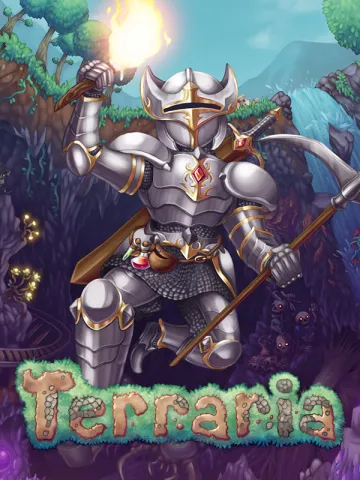
Terraria is a 2D sandbox: you mine, craft, build and fight your way across a world grown from a seed. Players have spent years extending it, and your server can run the game as Re-Logic ships it or with one of two community projects.
How to set up a Terraria server
- Choose a plan sized for your group.
- Select the location closest to the people who will play.
- Pay, and we build the server for you.
- In the control panel, name the world and set its size and difficulty. Add a password if you want one.
- Start the server and send your friends its address and port.
How to connect to your Terraria server by IP
- Open Terraria and choose Multiplayer.
- Choose Join via IP.
- Pick the character you want to play.
- Enter the server's address, then its port. Terraria's default port is
7777. - Enter the password if the server has one.
Mobile players enter the same address and port.
How to upload your own world
Terraria saves each world as a .wld file.
- Find the file on your computer. On Windows it is in
Documents\My Games\Terraria\Worlds, on macOS in~/Library/Application Support/Terraria/Worldsand on Linux in~/.local/share/Terraria/Worlds. - Stop your server.
- Upload the
.wldfile to the server's worlds folder. - Set the server to load that world and start it.
Terraria saves characters on each player's own device, so everyone arrives with their own inventory.
How to kick, ban and set a password
Terraria's server software takes commands in its console, typed without a leading slash:
kick <player name>removes a player.ban <player name>bans a player.password <new password>changes the server password.say <message>sends a message to everyone online.savesaves the world.
To lift a ban, open banlist.txt in the server's files and delete the player's name and IP address. For groups, permissions and a whitelist, run TShock.
tModLoader for content mods
tModLoader is the mod loader Re-Logic endorses, free on Steam as an add-on to Terraria. Players find mods in the Steam Workshop and in its built-in mod browser. Every player needs tModLoader at the same version as the server.
TShock for running a community
TShock is a toolbox for Terraria servers: groups, permissions, item bans, anti-cheat tools and server-side characters. It loads plugins of its own from a folder on the server, and players connect with the normal game.
Vanilla, if you prefer it
Run the unmodded server and your friends need nothing but the game. On a Journey world you choose who can use each power: everyone, the host alone, or nobody.
What our customers say
We’re rated excellent or 4.3/5.0 based on over 435+ reviews at
- June 14th
Great host! “ I've been with this host for a little over 7 months now. Support is given almost instantly. Max I ever waited was 30(ish) minutes. ”
- Daniel Ramirez
- May 20th
Excellent and easy to use host “ Excellent service, really quick and easy to set up with lots of options and systems that really take the hassle out of hosting a server. ”
- Reece Cooper
- May 5th
I LOVE using RAMShard! “ I very much LOVE using RAMShard. It's efficient, easy to use, and the staff is extremely helpful! ”
- Cole Spencer
Looking for more customer reviews?
Read More »FAQ
Have your own question? Ask us.
Each plan is sized for a group. Copper suits up to 4 players, Silver up to 12, and Gold 15 and more. Gold also has the most memory, which helps with a large world or a long mod list. You can move to a bigger plan later and keep your world.
You will find the three plans and their monthly prices in the plan cards near the top of this page. The price includes the server, DDoS protection and support. Quarterly and annual billing bring the monthly price down.
Yes. PC and mobile players can meet on a dedicated server when both run the same version of Terraria. Updates do not always reach both platforms on the same day, so after a patch you may have to wait until the versions match again. Console players cannot join a dedicated server at the time of writing.
Yes. You have full access to the server's files, so you can run vanilla Terraria, tModLoader or TShock and add your own mods or plugins. A tModLoader server and a vanilla server are separate things: a player on one cannot connect to the other.
It depends on the kind of server. For a tModLoader server, yes: each player installs tModLoader, which is free on Steam, at the same version the server runs. For a TShock server, no: its plugins run on the server and players connect with the normal game.
Open Terraria, choose Multiplayer, then Join via IP. Pick a character, enter your server's address and port, and type the password if you set one.
Yes. A Terraria world is a single .wld file. Upload it to your server's files, point the server at it and start it. Your character stays on your own device, so your inventory comes with you.
Set a server password. Players enter it after the address and port, and nobody gets in without it. You can change the password whenever you like, and you can kick or ban a player who should not be there.
You can. The dedicated server software comes with the game. Your PC has to stay switched on for the world to be online, and you forward port 7777 on your router so friends outside your home can connect. A rented server runs in a data center day and night, and you manage it from a control panel in your browser.
Yes. Our support team answers by ticket and live chat at any hour, and our knowledge base walks through the common jobs one step at a time.
A 3 day money back guarantee covers your order. Contact us within 3 days of your payment and we refund it in full.
Visa, Mastercard, American Express, PayPal, Apple Pay, Google Pay and Link.
Need a different game?
Choose from our list of games below.



